Working with digital assets like documents, images and video?Then you’ve probably noticed how difficult it can be to structure – and above all find – the right files across different systems and servers. One solution is to use a Digital Asset Management system, also known as a DAM system. In this article, we’ll take a closer look at what it is and how it can simplify your organisation’s file management.
Every second, huge amounts of data are generated and stored on servers, hard drives and cloud services. For a one-person business, storing files in folders might be enough – but as soon as several people need to access the same material, it becomes difficult to maintain a shared structure and even harder to find files someone else has saved.
Working with files without a DAM system quickly leads to challenges because the storage is unstructured. Files are spread across various devices, servers and folders without a unified logic.
The result? Time-consuming searches, confusion and inefficient workflows.
In many cases, it can replace two or three other systems – saving both time and money for your organisation.
What problems does a DAM system solve?
Centralised cloud storage. All files are gathered in one platform where you can search for everything from a single place. No more digging through folders or different systems. And because the storage is cloud-based, your files are available wherever you have an internet connection.
Metadata management. The key to good structure is metadata – information that describes the content of a file. It can be added manually or automatically. By using metadata, you can filter and refine searches to get more accurate results, and make it easier to share important details such as alt text, photographer credit or usage permissions.
Version control. When multiple people work on the same files, keeping track of the latest version is crucial. A DAM system lets you track and manage versions so only the most up-to-date file is used and published.
Sharing and collaboration. A modern DAM should include tools for sharing files internally and externally. Instead of email attachments, you can send large files – such as video – securely for review or delivery. Mediaflow’s Web Shares include smart features for sending, receiving and requesting feedback on files.
Using a DAM system increases both efficiency and security when working with files and digital content. It makes the workflow smoother – and reduces the risk of confusion.
What’s the difference between DAM and MAM?
Media Asset Management (MAM) is similar to DAM, but typically used for larger formats such as video and audio. Metadata plays an important role here too, and systems may include additional functions such as timecode management – especially useful for media and production teams.
Who is a DAM system for?
DAM systems are used across many industries. What they all have in common is a need to store and access digital assets — easily and collaboratively.
Examples include:
Brand & marketing teams – store brand assets and communication materials while maintaining a consistent visual identity.
Photographers – add metadata such as keywords, personal data and copyright information. With Mediaflow’s GDPR module, you can even collect consent digitally and connect it to your files.
E-commerce – integrate your DAM with your webshop and manage product images and descriptions more efficiently.
Corporate communication – store documents, presentations and internal materials. With Mediaflow, you can also add Media Portals to publish content internally or externally and make it accessible to more people.
In short, a DAM system is an essential tool for storing and managing digital assets in a secure, structured and scalable way.
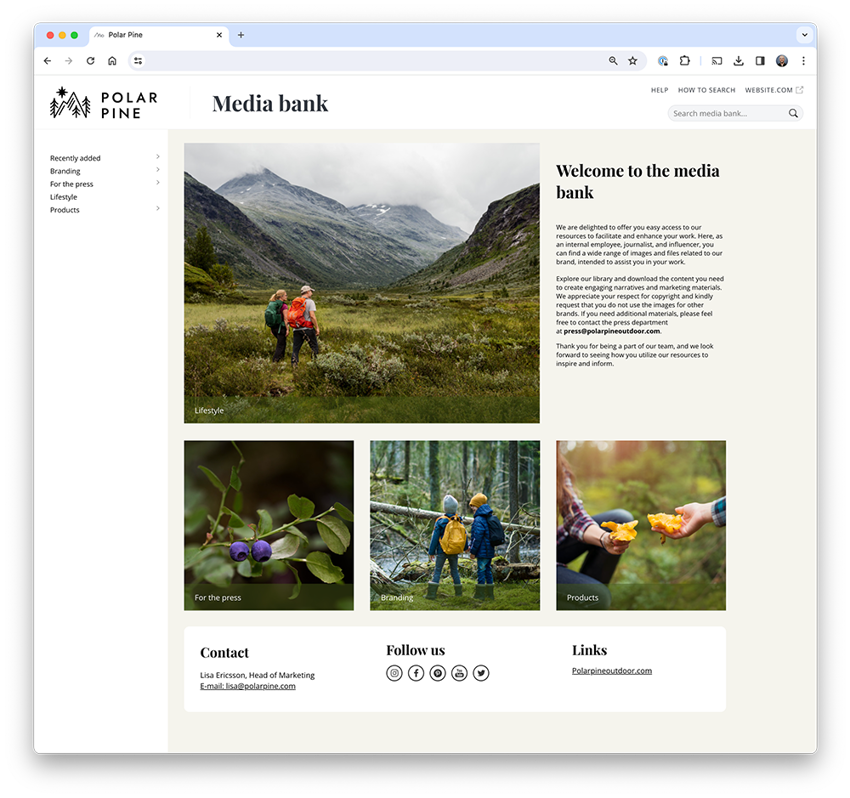
Create your own mediabank and share files internally or externally.
DAM, PIM or CMS – what’s the difference?
DAM, PIM and CMS are complementary systems within an integrated information management workflow.
DAM (Digital Asset Management) – manages files and media assets such as images and video.
PIM (Product Information Management) – focuses on product data such as technical specifications, descriptions and pricing.
CMS (Content Management System) – manages editorial and text-based content such as websites and blogs.
Mediaflow offers ready integrations with leading CMS platforms – such as WordPress, Sitevision and Optimizely – making it easy to insert images or video directly into your website.
Why choose Mediaflow’s DAM system?
Mediaflow creates flow in your daily work. Our platform often replaces two or three other services – increasing efficiency while reducing costs.
Mediaflow combines Digital Asset Management, Brand Management and Online Video in one GDPR-secure cloud-based solution hosted on Swedish servers.
Whether you’re a small business or part of a larger organisation, switching from OneDrive, Google Drive or Dropbox to Mediaflow’s DAM can make a significant difference. The platform can easily be extended with add-ons for video, livestreaming, branded templates, brand portals and media portals – so you can create your own internal or external media bank.
Since 2 August 2026, the EU AI Act has required that AI-generated and AI-manipulated content be clearly labelled. This applies above all to so-called deepfakes: images, audio and video created or altered with AI in a way that makes them appear authentic. It doesn't have to involve people; it could just as easily be a place, an environment or an event that looks real to the viewer.
We spoke with product manager John Robertsson about the features that have already launched and those still to come during the rest of 2026. After a run of releases early in the year, he promises the pace keeps climbing.
A common problem for many people working in Photoshop is that the creative work happens in one tool while the source files live somewhere else entirely. Mediaflow's Photoshop integration lets you bring that whole flow into a single step.