From file chaos to structure: how to organise your organisation’s content
16 April 2026
In many organisations, the volume of content is growing rapidly. Images from campaigns, video clips from events, presentations, documents and reports are created every day by different teams. Employees know the material exists somewhere, but not where.
When files are stored across email threads, local folders, cloud services and project tools, a familiar problem often appears: file chaos.
Many organisations end up in this situation sooner or later. But with the right structure, it is possible to bring order to your content.
How file chaos develops in organisations
File chaos rarely happens overnight. It builds up as the organisation produces more content than its structure can handle.
Common causes include:
content stored across multiple systems
different teams working in different ways
folders and file names lacking a shared structure
unclear ownership of content
As the organisation grows, it becomes increasingly difficult to maintain an overview of the material.
The consequences of unstructured content
When content lacks structure, it affects how the entire organisation works.
Common consequences include:
Time is lost Employees spend a significant amount of time searching for files.
Duplicate work Content is recreated even though it already exists.
Incorrect material is used Outdated or incorrect versions may be used in communication or marketing.
Collaboration becomes more difficult When content is scattered, it is harder for teams to work together.
What organisations do to create structure
Organisations that succeed in gaining control over their content usually follow a few clear principles.
Bring content together in one system
The first step is often to gather images, video and documents in one place, instead of spreading them across multiple tools.
When all material is stored in a shared platform, it becomes much easier to get an overview.
Create a clear structure
The next step is to organise content in a consistent way. This can include structuring material by projects or campaigns, departments or business areas, content type, as well as date or version.
A clear structure makes it easier for everyone in the organisation to navigate and find the right material.
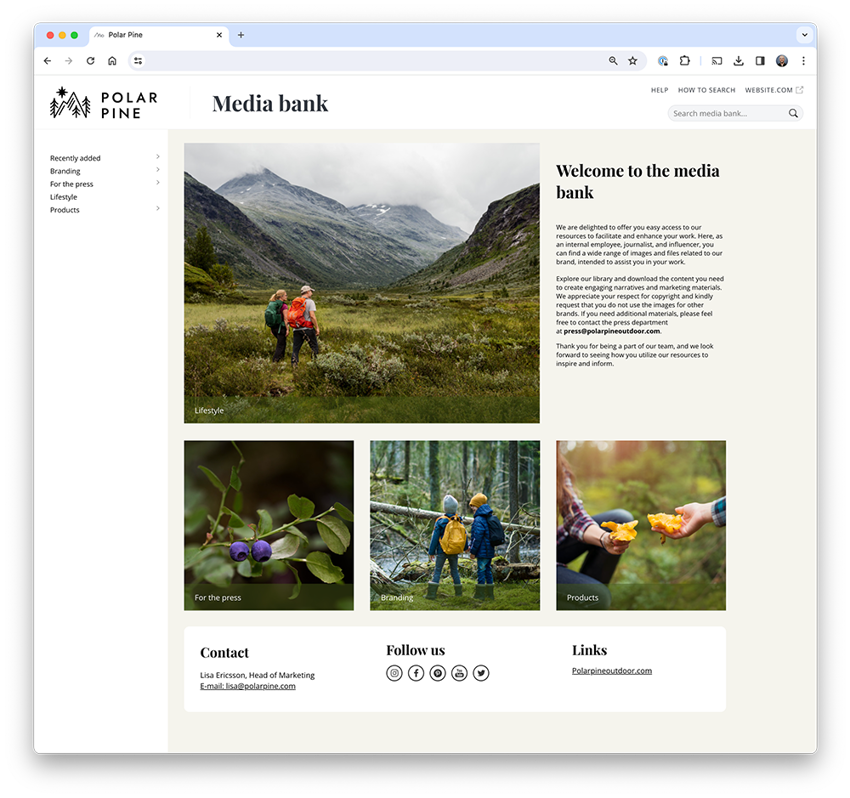
Create your own mediabank and share files internally or externally.
Make content searchable
In larger organisations, folders alone are not enough. That is why many organisations use metadata and tags to make content searchable.
This allows users to quickly find the right material, even in large content libraries.
Ensure the right version is used
An important part of structure is also version control.
When the organisation has a shared place for content, it becomes easier to ensure that everyone is working with the same and most up-to-date versions.
Structure makes organisations more efficient
When organisations move from file chaos to a more structured way of managing content, several things happen. Employees find material faster, teams collaborate more easily, and content can be reused in more contexts.
This means less time spent searching for files and more time creating valuable content.
Next step: build a long-term structure
For many organisations, the next step is to bring all content together in a Digital Asset Management platform (DAM).
Such a platform makes it possible to store images, video and documents in a shared library, organise material with metadata and categories, manage access and usage, and ensure the correct version is always used.
This allows organisations to build a sustainable structure for their content, even as the volume continues to grow.
Since 2 August 2026, the EU AI Act has required that AI-generated and AI-manipulated content be clearly labelled. This applies above all to so-called deepfakes: images, audio and video created or altered with AI in a way that makes them appear authentic. It doesn't have to involve people; it could just as easily be a place, an environment or an event that looks real to the viewer.
We spoke with product manager John Robertsson about the features that have already launched and those still to come during the rest of 2026. After a run of releases early in the year, he promises the pace keeps climbing.
A common problem for many people working in Photoshop is that the creative work happens in one tool while the source files live somewhere else entirely. Mediaflow's Photoshop integration lets you bring that whole flow into a single step.