How organisations avoid version chaos in images and documents
16 April 2026
In many organisations, multiple versions of the same file are in circulation. An image is updated, a document is edited or a presentation is revised, but the new version does not always end up where everyone can find it.
Employees download files, make changes and save new copies. Over time, multiple versions of the same material start to exist across the organisation, making it difficult to know which one is the current version.
However, version chaos can be avoided. Organisations that manage their content in a structured way follow a few clear principles to keep their files organised.
Why version chaos occurs
Version issues often arise when content is shared and stored across multiple locations.
For example, the same file might exist in:
email threads
local folders
cloud services
project tools
When several people work on the same material at the same time, new versions are easily created without replacing the old ones. As a result, the organisation ends up with multiple versions of the same file.
The consequences of version chaos
When organisations lack control over versions, it often leads to practical problems.
For example:
Incorrect material is used Outdated images or documents may accidentally be used in communication or marketing.
Teams work in different versions Different people make changes in separate files.
Time is lost Employees spend time trying to find the correct version.
Content spreads without control Old files continue to circulate even when they are no longer relevant.
How organisations gain control over versions
Organisations that successfully avoid version chaos typically follow a few clear principles.
Bring all material into one place
One of the most important steps is to gather images, video and documents in a shared system. When everyone works from the same library, the risk of files being scattered across different folders and tools is significantly reduced.
Work with clear version control
Instead of creating new copies of a file, organisations can use version control.
This means new versions are saved within the same file history, while older versions are still available. Users can always see which version is current, making it easier to track changes over time.
Create a clear content structure
When content is organised with clear categories and metadata, it becomes much easier to find the right material. A clear structure also reduces the need to create duplicate files.
Make it easy to find the right file
When users can quickly find what they need, the need to download files and save personal copies decreases.
Search functionality, metadata and a clear structure make it easier for the organisation to work efficiently with its content.
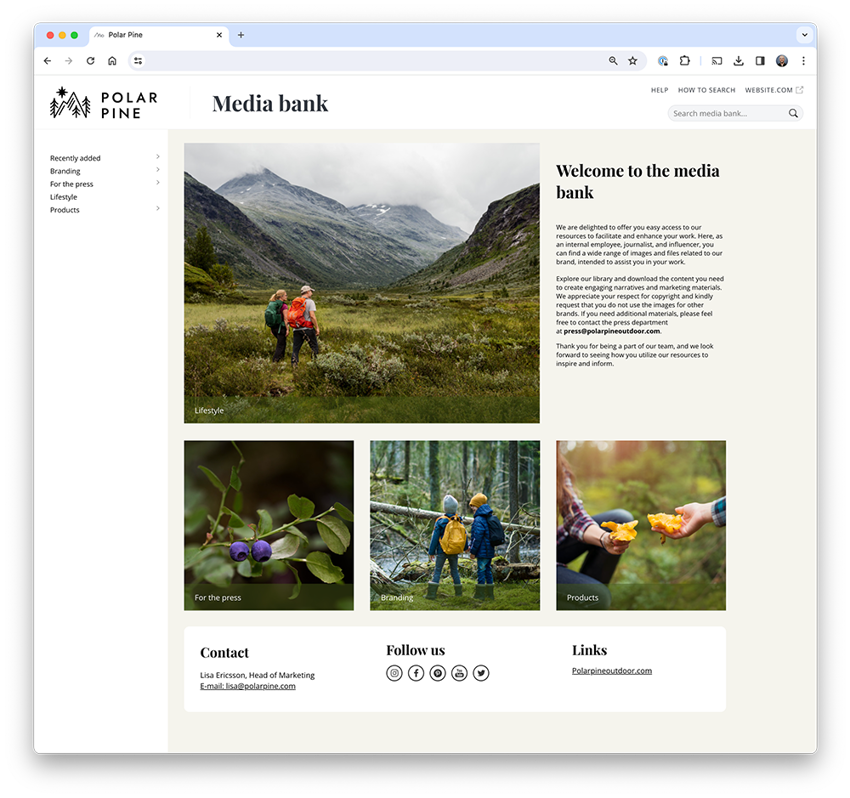
Create your own mediabank and share files internally or externally.
Structure reduces the risk of version chaos
Version chaos rarely happens because of a single file. It is usually the result of a lack of clear structure in how content is managed across the organisation.
When organisations take a more systematic approach to managing images, video and documents, it becomes much easier to maintain control over versions. This allows teams to work more efficiently and feel confident that the right material is being used.
A platform for managing versions
Many organisations use a Digital Asset Management platform (DAM) to collect and organise their content. Such a platform makes it possible to store images, video and documents in a shared library, manage file versions, make content searchable, and control access and usage.
This helps organisations avoid version chaos and create a more structured approach to managing content.
Summary
Version chaos is a common challenge in organisations that handle large amounts of content. When files are spread across different systems, it becomes difficult to know which version is the current one.
By bringing content together, using version control and creating a clear structure, organisations can gain better control over their images and documents.
The result is a simpler and more efficient way of working.
Creativity and making things are often associated with freedom. Having space to experiment, think differently and work without constraints. Yet too little structure can, in practice, make creativity harder to achieve.
Since 2 August 2026, the EU AI Act has required that AI-generated and AI-manipulated content be clearly labelled. This applies above all to so-called deepfakes: images, audio and video created or altered with AI in a way that makes them appear authentic. It doesn't have to involve people; it could just as easily be a place, an environment or an event that looks real to the viewer.
We spoke with product manager John Robertsson about the features that have already launched and those still to come during the rest of 2026. After a run of releases early in the year, he promises the pace keeps climbing.