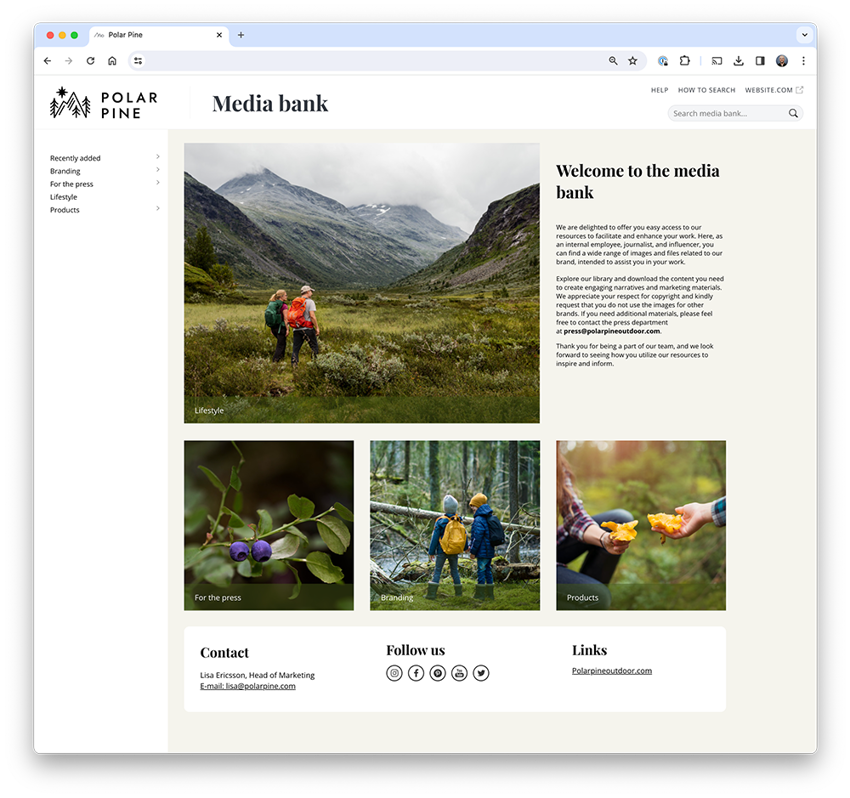
Sharing images, video and documents externally is a natural part of everyday work for many organisations. But without the right structure, it quickly becomes difficult to keep both content and brand consistent.
A media portal makes it possible to collect, control and share content in a way that is both easy to use and easy to manage.
What is a media portal and why is it used?
A media portal is an external interface connected to your media library (DAM), where selected and approved content is made available to others.
Instead of sending files or sharing folders, you create a place where recipients can find and download the right content themselves, directly from the source. It’s not just about what you share, but how you make it available.
Many organisations start with simple solutions. But over time, the same pattern appears: files are shared without control, versions get mixed up, and content remains in use even when it should have been replaced.
What’s missing is a single source where content is always up to date, approved and ready to use.
From file management to content distribution
A media portal fundamentally changes the way you work. Instead of managing individual files, you create a flow where content is already available.
In practice, this means working in your media library (DAM), selecting which material should be visible externally, and letting recipients access what they need themselves. This removes manual steps and ensures that content is always used from the right source.
Full control, even when content is shared externally
A common concern when sharing content externally is losing control. But because the media portal is directly connected to your media library, control remains centralised.
You decide what is visible, to whom, and under what conditions. At the same time, the connection to the original file remains intact, meaning updates are reflected instantly and outdated versions do not continue to circulate. This means you are not just sharing content, you are controlling how it is used and perceived.
An experience that strengthens your brand
When material is shared across scattered channels, the experience often becomes fragmented. A media portal brings everything together in a branded environment where the recipient encounters a consistent expression.
This creates confidence, both for those sharing the content and those using it.
How media portals are used in practice
Media portals are used in many different contexts, but the common need is to share content without friction.
Press teams get quick access to up-to-date images
Resellers find the right product material
Agencies and partners work with updated campaign content
Organisations share resources externally without losing control
Create your own mediabank and share files internally or externally.
When does a media portal make the biggest impact?
The need becomes clear when many external parties use your material, when content is updated frequently, or when your brand needs to stay consistent across multiple channels.
This is relevant if you want to:
reduce manual work
ensure the right material is always used
maintain control even after content has been shared
Without a structured solution, you risk the opposite: more administration, less control and a brand that becomes harder to manage consistently.
A natural extension of your media library
A media portal is not a standalone solution, but an extension of your media library (DAM). This is where structure, metadata and permissions are managed, making external sharing possible without compromising control.
Easier for recipients, safer for you
What makes media portals powerful is the balance. For the recipient, it is easy to find and use content. For you, control remains in the background.
This is when sharing is no longer about sending files, but about making the right content available in the right way.
Summary
A media portal is an extension of your media library (DAM) and a structured way to manage how content is shared, used and experienced.
When the right material is always available and under control, it becomes easier to work efficiently, consistently and with confidence in every publication.
Creativity and making things are often associated with freedom. Having space to experiment, think differently and work without constraints. Yet too little structure can, in practice, make creativity harder to achieve.
Since 2 August 2026, the EU AI Act has required that AI-generated and AI-manipulated content be clearly labelled. This applies above all to so-called deepfakes: images, audio and video created or altered with AI in a way that makes them appear authentic. It doesn't have to involve people; it could just as easily be a place, an environment or an event that looks real to the viewer.
We spoke with product manager John Robertsson about the features that have already launched and those still to come during the rest of 2026. After a run of releases early in the year, he promises the pace keeps climbing.