Some of it is brand-new functionality, some is a host of smaller interface improvements that make everyday work a little clearer. Here's a rundown of what's new.
Two features already in place
Two features launched very recently, and you may well have tried them already.
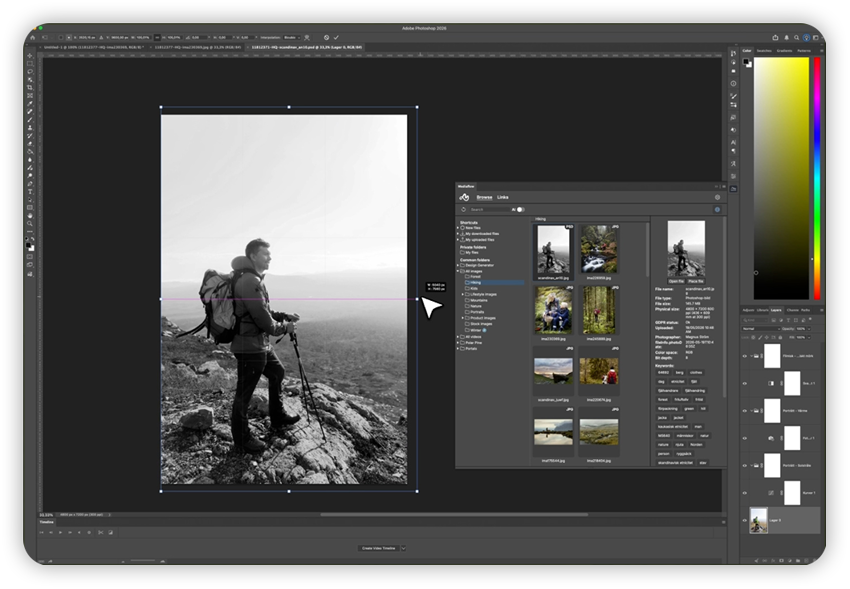
The first is a Photoshop plugin. It builds on the integration that already existed for InDesign, now with Photoshop included. Just as in InDesign, you can place images directly, but Photoshop is more often about opening an image to edit it. You can now open an image from Mediaflow straight in Photoshop, work on it and save it back into Mediaflow, much like an integrated version of our Open and Save. The feature is part of the integration for Pro users and installs via Creative Cloud.
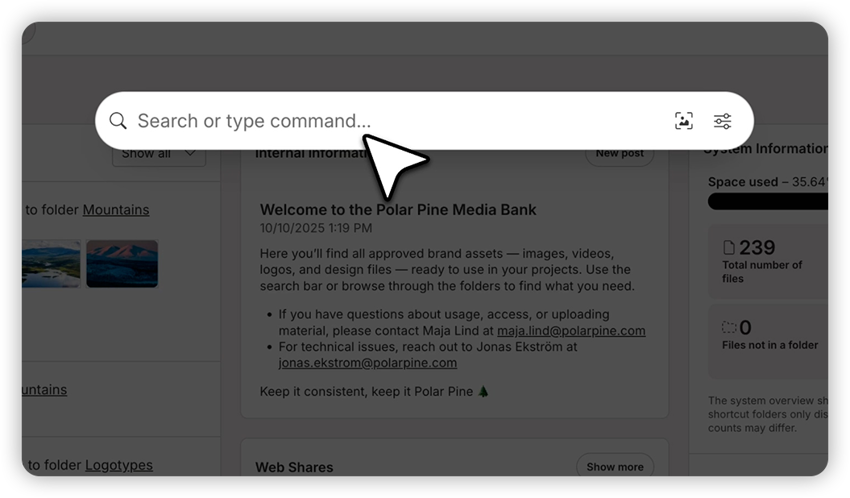
The second, Command Palette, changes how you search and navigate across the whole system. Instead of hunting around, you get a single place to reach almost everything, both search and commands like downloading files or creating web links.
"It's like a hub inside Mediaflow for doing all sorts of things in a much smoother, simpler way," John Robertsson explains.
A key part of the palette is what Mediaflow calls contextual AI search. Rather than just entering keywords, you can describe what you're after and steer which content you actually get. If you want a cat, the word "cat" will do, but the real strength lies in the descriptions, such as a cat sitting on a sofa with the sun shining in through the window.
The advice is to be as specific as possible.
"The clearer you are, the easier it gets," says John.
That said, it helps to know the limits. The AI isn't aware of things like specific streets, addresses or cities, so "the house on Kungsgatan with a red roof" gives a poorer match than simply "a house with a red roof".
New web links built for real collaboration
Web links are one of the most appreciated and most used features in Mediaflow, and they are now being rebuilt from the ground up rather than merely extended. The core stays, you share and receive files, but it all happens in a brand-new interface with far more room for collaboration.
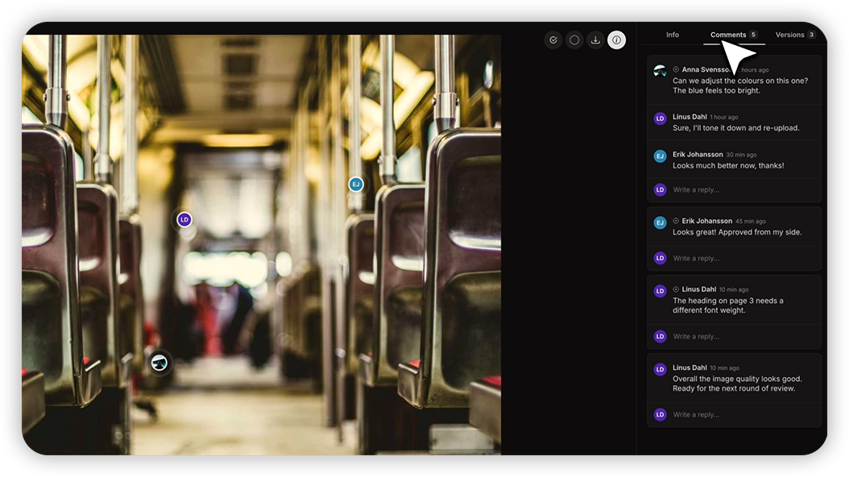
One of the biggest changes is comments that can be tied to specific parts of a file. Instead of writing "remove the lamp post on the right", you can drop a pin on the image and point to exactly the lamp post you mean, so the recipient understands straight away. Approval flows also become clearer visually, with statuses marked by colours and icons directly in the web link.
The web link is also brought into the system in a new way. It used to live a life of its own outside Mediaflow, but now you'll be able to see the link, all its comments and work with it without clicking away anywhere. On top of that comes the option to brand the web link, much like the new start page, so it's clearly your organisation sending it out.
"We want it to become a genuine collaboration link, more than just sending and receiving files," says John.
As the plan stands, this lands sometime after the summer, in the third quarter. The interface itself is already done.
AI labelling ahead of the AI Act
The next feature ties into the EU's new AI Act, the framework governing how AI-generated material may be used and labelled. The requirements tighten as we use more and more AI material, and a central part takes effect on 2 August 2026.
Lawyer Katarina Ladenfors has explained what actually applies. At its heart it concerns so-called deepfakes, meaning AI-generated or AI-manipulated content in the form of image, audio or video. It doesn't have to involve people; it could just as easily be a place, such as a woodland grove or a picture by a lake, that comes across as authentic to the viewer.
Under article 50 of the regulation, a clear disclosure is required that the content has been artificially created or manipulated.
"It has to be done in a clear and distinguishable way at the point of the first interaction," says Katarina Ladenfors.
There's no requirement for a particular symbol, though. Text can be enough, and it must also be clear where the content comes from, for instance if it was generated in a specific system.
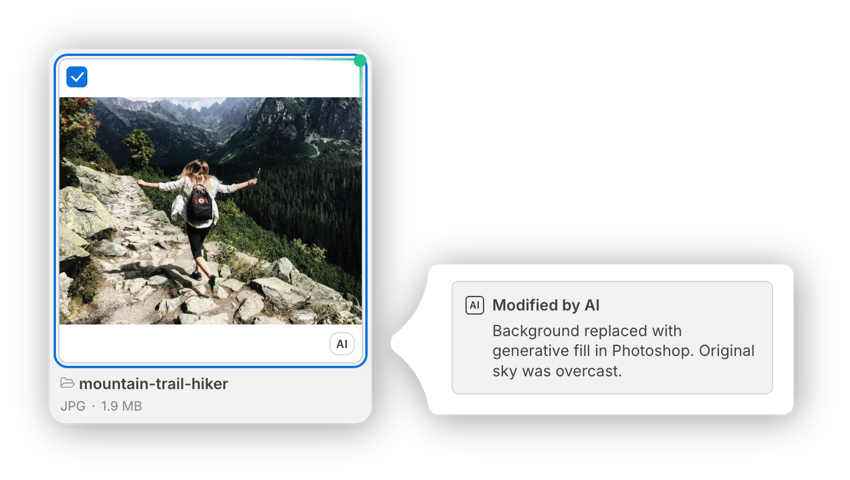
For Mediaflow's users, this means a new feature inside the system. You'll be able to mark a file as generated or modified by AI, add free text about what was changed or where it came from, and the label then travels with the file to the places where the image is used. Further ahead, the aim is to detect the origin automatically, based on the standards currently being developed.
This differs from the colour labels customers have previously been pointed to. With the new feature you get free text for each file and a clear icon showing that it's AI, without anyone needing to know internal rules about what red or orange means. It becomes clear even for web editors and others outside administration, and the colour labels are freed up for other uses.
Keeping pace with new legislation is nothing new for Mediaflow, which has previously handled both GDPR and accessibility requirements for video. The thinking is the same here: the feature should be in place in time, so no one has to wait or build a workaround in the meantime. The 2 August deadline is firm, and even though it falls right in the holiday season, the ambition is clear.
"It's been a clear requirement and a wish on my part that it should be ready by the time it comes into force," says John.
Trimming video with skip chapters
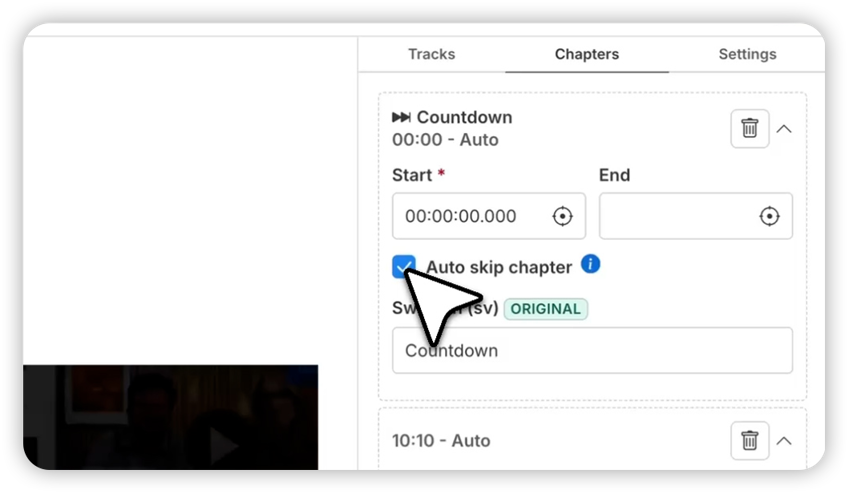
A feature many users have asked for over the years is the ability to trim video clips, above all for live broadcasts, directly in Mediaflow. It's called skip chapters, since it builds on chapters that the viewer automatically skips past.
Picture a longer broadcast with an intro at the start, some loose ends at the end and a few pauses in between. Instead of downloading the video, cutting it and uploading it again, you create an ordinary chapter and mark it to be skipped. When the player reaches that point, it automatically carries on past it. The parts aren't hidden entirely; the viewer can still click into the chapter and gets a small button suggesting they skip.
John is careful to describe what it is, and isn't.
"It's not an editing feature, but a smooth way to actually skip the parts you don't want," he says.
So the original isn't affected, and the statistics stay gathered in one place instead of being split when a video is swapped out. The feature sits in Video Manager, in the versions that have access to chapters, and is releasing any day now. It may well already be out.
A new design generator on the way
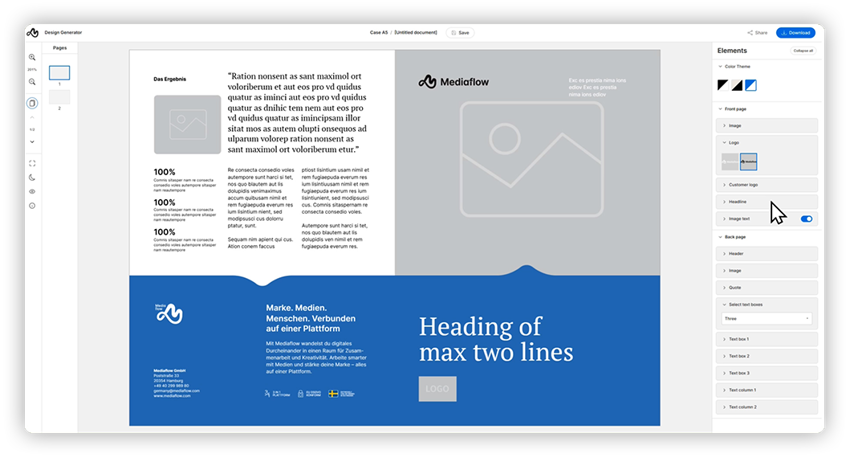
For those of you working with templates and the design generator, a new interface is coming during the autumn. The save, share and download menu has moved up to the top edge, the pages have moved to the left while the tool panel stays on the right. In the right-hand panel, objects can now be grouped under headings for a better overview. Perhaps the most important change is that far more can be edited directly in the graphical overview in the middle, such as sizes, which wasn't possible before. A new button also lets you show all editable fields, handy in templates with lots of elements.
This is an update that will initially roll out to a selection of customers, who get to help test it before it becomes available to everyone.
Further ahead: meeting systems, CDN and new media portals
There are more plans further down the line.
One upcoming addition is an integration for meeting systems, meaning the systems that handle agendas, speakers and voting at, say, municipal or regional council meetings. Today such broadcasts have to sit outside Mediaflow's play portals, but the integration makes it possible to embed a combined view with speakers, agenda, any votes and live video directly in the portal. First out is Presidium, developed by Digitalstudion, and that integration is already in place. Next in line is Cybercaster from Wallén Media, both established players where Mediaflow has several shared customers.
Also close at hand is the option to connect Mediaflow to a CDN, a Content Delivery Network. For anyone distributing files to very large audiences, for example via a website or a newsletter with wide reach, it means more reliable delivery that copes with heavy traffic. An added benefit is that the file gets a clear origin. Remove it in Mediaflow and it disappears everywhere, instead of having to be taken down manually in various places.
"It becomes an origin, as the saying goes," says John. In other words, it's more traceable.
Finally, a new version of the media portals is on the way during the year. The media portals are one of Mediaflow's best-selling products, and the new version is set to be far more flexible, with greater scope to change design and content. Existing customers will be able to switch over smoothly and gain access to more functionality.
In summary
There's plenty to look forward to. Some is already in place to try, while other things land after the summer and during the autumn, with more webinars to come.